General Questions
What Is CheckFlow?
CheckFlow is cloud software for creating and managing your team's process documents as checklists.
You build a template — the blueprint for a process — and then run as many checklists from it as you need, tracking progress on a live dashboard.
A checklist can:
- Show read-only content in its tasks: text, images, videos and files.
- Capture data through input controls — text boxes, date pickers, dropdowns, tables and more — and refuse to let a task be completed until the data is there.
- Assign tasks to users and groups.
- Carry due dates, calculated automatically if you want.
- Control the order tasks are completed in, using halt tasks.
- Show and hide tasks based on conditional logic.
- Run to a schedule, without anyone starting it by hand.
- Be permissioned down to the individual template, checklist and task.
New to CheckFlow? Start with Getting Started.
How Can I Contact Support?
By email at support@checkflow.io, or through the live chat widget in the bottom right of the app.
See Contacting Support for response times and what to include in your message.
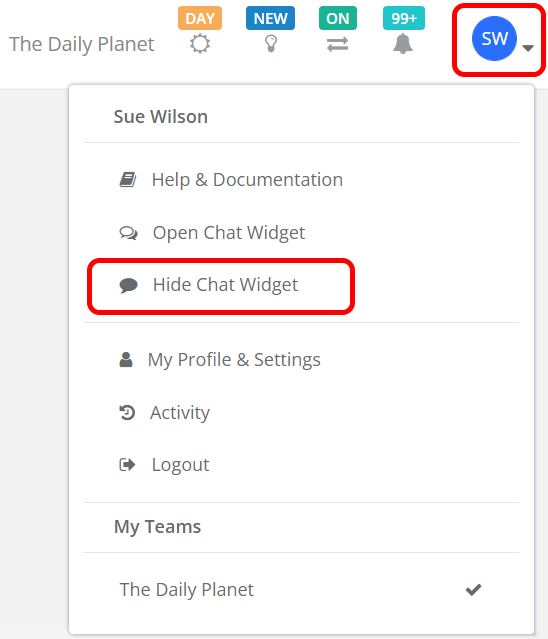
Can the Chat Widget Be Hidden?
Yes, and the setting persists — CheckFlow stores it in a cookie, so the widget stays hidden the next time you visit.
- Click your Avatar at the top right of the screen to open the User Menu.
- Select Hide Chat Widget.
To bring it back, choose Open Chat Widget from the same menu.
Related Pages
- Getting Started — building your first template and running your first checklist.
- Templates & Checklists FAQ — the difference between the two, and how to create each.
- Contacting Support — how to reach us and what to expect.
- Features & Security FAQ — roadmap, feature requests, security and hosting.